Using OMNY
In order to use the subway, you need to pay a fare using the OMNY system (which stands for One Metro New York). OMNY was introduced in 2019 and the previous system using a yellow, plastic MetroCard has been fully phased out.
OMNY payment methods
There are three ways to pay using OMNY:
- A digital wallet
- A contactless bank card
- The OMNY card
All three payment methods generally work the same, in that you have to hold the payment method against a special OMNY reader to unlock the turnstile.
A digital wallet
Your smartphone or smartwatch likely already supports a digital wallet like Apple Pay, Google Pay or Samsung Pay. With these digital wallets you usually set up one or more credit/debit cards as a payment option(s) and select one as the default payment. Depending on your phone/watch settings, you might have to unlock the device before you can use it at the OMNY reader. On Apple Pay, I recommend you set up your card as a Transit Express card, which will allow you to tap your phone/watch without unlocking your device. With most digital wallets, as you tap your device against an OMNY reader it will vibrate indicating successful payment.
A contactless bank card
Many credit cards, debit cards or prepaid cards already support contactless payment. Oftentimes, on the back of these bank cards you will find this logo:
which indicates that the card supports contactless payment. You might have to call your bank to activate contactless payment if you have never used it that way. If your bank card does not support contactless payment, you can still pay with it if you add it to a digital wallet discussed previously.
The OMNY Card
The OMNY card is a physical, plastic card. It is shaped like a credit card with the word OMNY in the front. It has barcodes both on the front as well as on the back of the card. The back side also has a magnetic stripe as well as an expiration date.


These cards will carry a monetary value/balance. Each time you use the card to pay for a ride, the cost of the ride will be subtracted from its balance. OMNY cards are sold at every subway stations at OMNY vending machines, usually just before you enter the turnstiles:
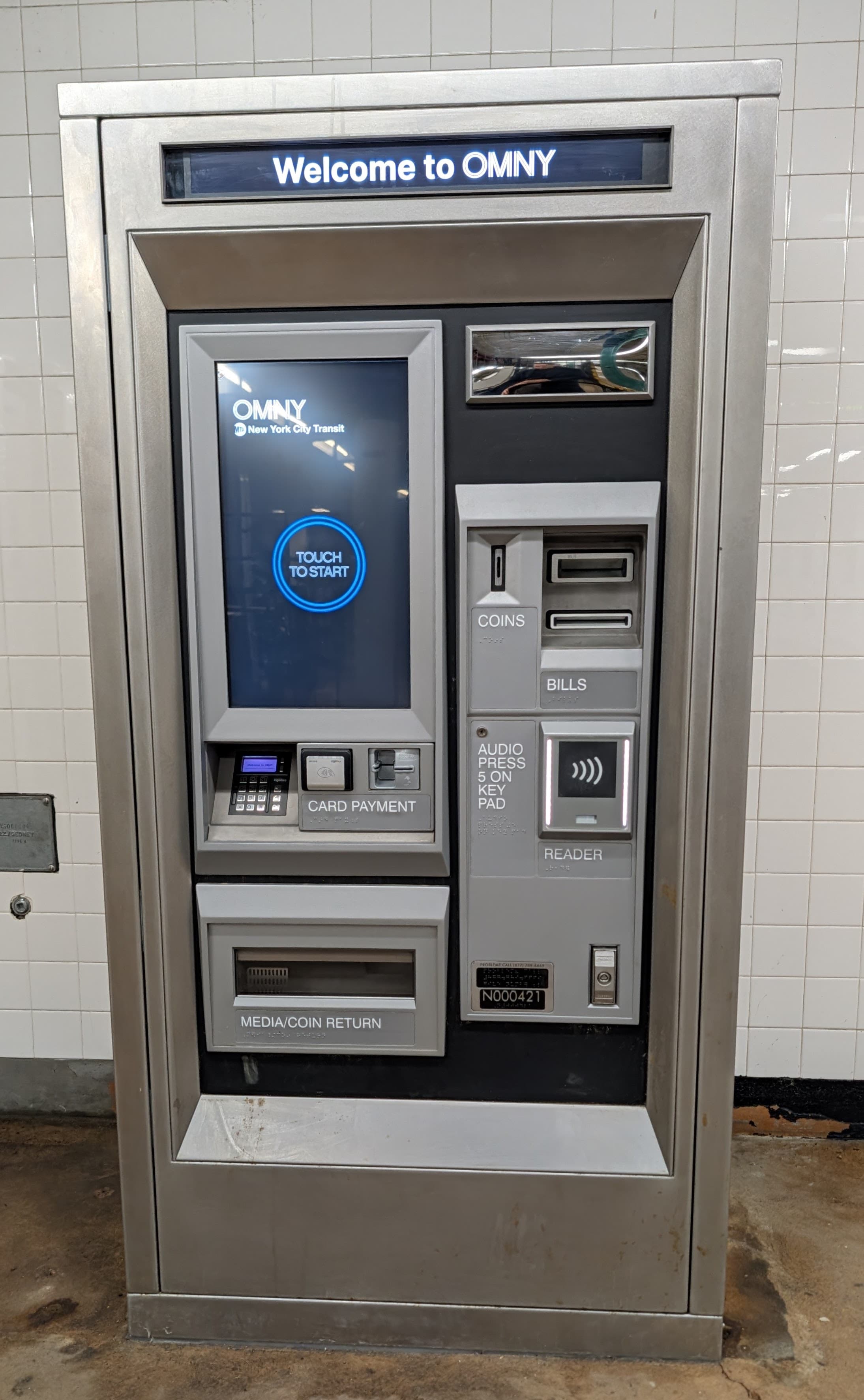
At these OMNY vending machines, you can buy OMNY cards with a credit card or cash. You can also view the balance of existing cards and reload them as necessary.
You can also buy them at local retail locations (like CVS, Walgreens, 7-Eleven stores). They come in a black gift-card like sleeve like so:


The OMNY card costs $1 to buy (regardless of whether you buy it from an OMNY vending machine or a local retailer). This $1 does not go towards the balance of the card (e.g., it will cost you $11 to buy a new OMNY card with a $10 balance). You can check the balance of the card at OMNY vending machines or special standalone OMNY balance readers. Once you have used the OMNY card once, you can then also register your card online at omny.info to view and reload the balance, as well as seeing your ride history.
As noted the OMNY card has an expiration date printed on the back of the card after which the card becomes unusable. Newly issued cards usually don't expire until 7 years from issuance. You can transfer any remaining value on the card to a new card up to two years after the expiration date.
A word of caution: the OMNY card has a bunch of details in the back including an 18-digit card number, a CVV number and an expiration date. Using this information, anyone can register the card online, see the card's transaction history and even transfer its balance to another card by marking it as lost. As such, be careful about posting pictures of back side of the card on social media.
Using OMNY
Once you are set up with any of these three payment methods, you are ready to use it to pay for your subway ride. You will find OMNY readers at every turnstile at every subway station and on every MTA bus throughout the entire system. The readers look like this:

Note that the reader is slightly angled to the left, because each reader always unlocks the turnstile to the left of it.
In order to use OMNY, first make sure that the reader has the four blue corner lights and says "OMNY TAP HERE":

As you approach the turnstile, simply hold your payment method near the reader (you don't actually have to touch it). You will hear a beep and the digital screen will display "GO" with green corners:

At this point, the regular single-ride fare of $3 has been deducted from your payment method and you should proceed in going through the turnstile to the left of the reader. You do not have to hurry as the turnstile will remain unlocked until you go through it (but don't hold up other commuters behind you for that matter). If for some reason the tap is not confirmed, an error message will appear with one of the following reasons:
- TAP AGAIN: The tap was not successful. Simply try again.
- TAP ONE CARD: You are likely trying to tap with multiple payment methods at the same time. This usually happens if you tap a physical wallet with multiple eligible cards in it, or maybe your mobile phone has one of those fancy cases that also holds a credit card. Make sure to tap only one payment method at a time.
- PAYMENT METHOD EXPIRED: The bank card has expired.
- PAYMENT NOT ACCEPTED: This particular payment method is not accepted with OMNY.
- RIDE LIMITED EXCEEDED: While you can tap a single payment method multiple times to pay for multiple people traveling in a group, you can do so only at maximum 4 times (including yourself) at any given station.
Children under 44 inches (112 cm.) regardless of age can ride trains for free as long as they are accompanied by a fare-paying adult. (The children can just walk underneath the turnstile.)
Unlimited Ride
Besides using OMNY to deduct $3 for each ride, the MTA also supports a fare capping mode. Think of it as an "unlimited week pass". This is how it works:
In any given 7-day period, if you use OMNY more than 12 times, all remaining rides until 11:59pm on the 7th day are free. This is known as fare-capping and basically sets the maximum amount you have to pay at $35 (a little bit less than 12 * $3).
In order for this to work, you must use the exact same OMNY payment method each time. The system will deduct $3 for each of the first 11 rides. The 12th tap will only cost $2 (to make this a whole $35) and all remaining rides will be free for the rest of the 7-day period.
Note that the 7-day period can start on any day of the week, but ends at midnight on the 7th day. For instance, if you first tap on a Wednesday at 10pm your "free" window will end next Tuesday at 11:59pm.
For those travelling in a group, remember that you can use a single OMNY payment method multiple times at a given turnstile to let through multiple people, but only the first tap in that case will be counted against your fare capping goal. In other words, each person must accrue their own 12 rides individually using their own payment method.
OMNY does not support monthly passes. This used to exist with the previous MetroCard system, but as of 2026 there is no indication that the MTA will re-introduce them.
Other OMNY Information
Here are some other things to know about OMNY:
- Senior citizens, and people with disabilities can use OMNY at a reduced fare ($1.50 per ride) by applying for the MTA Reduced-Fare program. You will then receive a special Reduced-Fare OMNY card. NYC-based students typically also receive these Reduced-Fare OMNY cards through their school.
- For each ride, the system allows for a single free transfer between subway and buses (within 2 hours). With OMNY, make sure to tap the exact same payment method on both forms of transportation. The OMNY reader still says "GO" on the second tap, but at the end of the day, the MTA will only charge you a single fare.
- While not required, you can also optionally register for a free OMNY account online so you can view your trip history and manage your payment methods and card balance. This even works retroactively, so even if you register today and specify the details of your payment methods, you can see a full history of past usage as far back as a year including the specific time and location of each tap.
- A long term goal is for OMNY to replace all of New York's transportation modes. You can already use it on all subway lines as well as the Staten Island Railway. It is also available on local, limited, and express buses including Select Bus Service routes buses, and the AirTrain at the JFK airport. Expect to see OMNY even on commuter rail lines like Long Island Rail Road and Metro-North in the future.